The 1.6.9 patch finally brought several PC-side changes to Stardew Valley on consoles, and I was most excited about two things that feel very different from each other. One is the new friend who helps me track down lost items, which is a quiet quality-of-life improvement I did not know I needed. The other is the arrival of hidden cheat commands, a feature that feels almost like a secret developer door tucked behind the normal farm loop. The patch also tweaks some dialogue with town residents, so even familiar conversations can feel a little fresh. But the cheat commands are the part that made me open a save editor for the first time in years.

I want to be clear about the risk before I explain the fun part: editing a save file is not a casual click. If I make a mistake, I can break the file completely, and no amount of in-game planning fixes a corrupted save. So I always make a backup first. I copy the save to another folder, label it with the date, and only then open the original in a save editor. That single habit has saved me from more than one experimental mistake. 💾
⚠️ The Two Known Console Cheat Commands
At the time the 1.6.9 console update arrived, there were only two cheat commands available through this new mechanic. That is a small list, but it is still powerful. Entering them is a process, not a simple console code. Here is the sequence I follow:
-
Open the save file in a save editor.
-
Find the relevant element for the new cheat-command flag.
-
Change its value to
true. -
Load the save file normally.
-
Use the in-game chat box to enter the cheat commands.
The exact element name is the part I check carefully against the current guide for my platform, because a wrong edit is exactly how a save gets wrecked. Once the flag is set, though, the commands are simple.
| Command | What it does | Example |
|---|---|---|
/money |
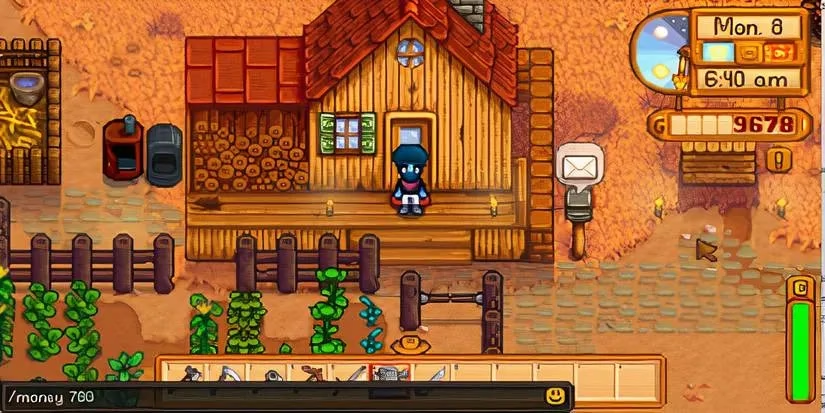
Adds the chosen amount of money to my wallet | /money 700 |
/debug |
Runs a debug command through the chat box | /debug player_add name "Galaxy Sword" |
The money command is the one I use when I want a faster start. I do not need a mountain of gold; I just want enough to buy seeds, pay for a construction project, or stop worrying about every early-game purchase. The debug command is broader and stranger. It lets me run debug commands through chat, and the reference example is adding a Galaxy Sword by name. That is the kind of command that can shortcut a lot of grinding, but it is also the kind that reminds me why backups matter.
🌱 Why I Use Them Carefully
I like these commands because they change the pace of a farm, not because I want to skip the whole game. A little extra money means I can experiment with crops and layouts instead of replaying the same early money loop. The debug command is more of a testing tool for me. I use it to check an item, test a build idea, or recover from a strange situation, and then I go back to normal play. That balance keeps the game fun.
The new lost-item friend fits the same quality-of-life mood. Instead of wandering around trying to remember where I dropped something, I have a helper who makes the search less tedious. The altered dialogue is a smaller change, but I notice it because I talk to the same residents constantly. It makes the town feel less static.
As of 2026, I still treat the 1.6.9 console update as the baseline for these hidden commands, but I do not assume the list is frozen. More commands may have been added later, and save structures can change with patches. Before I edit anything, I check the current patch notes and the latest community guidance for my platform. If the steps no longer match, I stop. A working backup and a cautious pace are worth more than a fast shortcut.
For anyone trying this, my advice is simple: back up first, edit one thing at a time, and test with a small command before doing anything dramatic. The two known commands are a neat secret in Stardew Valley's console version, but they are not worth losing a long-term farm over.
Data referenced from GamesIndustry.biz helps frame why a Stardew Valley console patch like 1.6.9 matters beyond small feature notes, since platform updates that add quality-of-life tools, refreshed dialogue, and hidden debug-style functionality often reflect a broader effort to keep long-running games active and relevant for established players while reducing friction for return visits.